Thomson Reuters experts demonstrate how the next generation of CoCounsel Legal works in practice
Highlights
- CoCounsel Legal's Tabular Analysis reviews up to 10,000 contracts against 100 questions in a single prompt.
- Brief Builder pauses for lawyer review at four checkpoints before producing a formatted legal brief.
- Fiduciary-Grade AI™ grounds every answer in Westlaw, Practical Law, and firm precedent, showing its sources throughout.
That question framed a recent Thomson Reuters webinar, where legal professionals got a first look at the next generation of CoCounsel Legal. The session was led by Valerie McConnell, Vice President of Solutions Engineering at Thomson Reuters, who walked attendees through live demonstrations of new workspace tools, bulk document review, and a new brief drafting workflow. Jackie Schmiedlin, an AI Solutions Architect at Thomson Reuters, closed the session by fielding questions from the audience.
Jump to ↓
Not all legal AI is built the same
An agent that works like a senior associate
Reviewing thousands of contracts with one prompt
Briefs that keep the lawyer in the loop
Not all legal AI is built the same
McConnell opened with a warning. Most firms are still in an early, ad hoc phase of AI use with unclear returns, while the firms pulling ahead have moved to firm-wide deployment and are taking on more complex, higher-stakes work as a result.
“The data we’ve collected is clear. Firms with a clear AI strategy are nearly twice as likely to be seeing revenue growth from that AI use.”
Vice President of Solutions Engineering, Thomson Reuters
The point, she added, isn’t to experiment with AI more, but to deploy it deliberately.
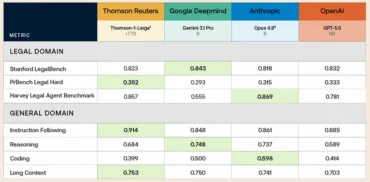
She drew a line between three categories of tools. General-purpose AI is broadly useful but shallow in any one domain. A step further are professional-grade tools, built for a specific field where an occasional error is tolerable. Then there’s a third tier, what Thomson Reuters calls Fiduciary-Grade AI™: built for work where a small error can mean a lost case or a client’s trust, not just lost time.
“General-purpose AI is still impressive, but these tools weren’t built for the law,” McConnell said. Those tools pull from the open web and can’t confirm whether a case has been overruled or ground an answer in verifiable legal authority. Fiduciary-grade AI is different, built on authoritative content, engineered by AI experts, and evaluated by practicing attorneys at every step.
An agent that works like a senior associate
CoCounsel Legal was rebuilt from the ground up on Claude, Anthropic’s frontier reasoning technology, then made purpose-built for lawyers and grounded in more than 150 years of authoritative legal content. Lawyers describe what they need in plain language, no prompt engineering required, and the system builds its own plan and works through each step, reasoning from Westlaw, Practical Law, and the firm’s own precedent along the way.
One deliberate design choice stood out. Drafting happens last. CoCounsel Legal has to finish its research and document review before it writes a word, so the draft it produces reflects what the law says today.

Reviewing thousands of contracts with one prompt
Inside CoCounsel Legal’s Workspaces, the new Tabular Analysis feature can review up to 10,000 documents against 100 questions at once. Lawyers can upload their own list of due diligence or discovery questions, or simply describe the goal, such as flagging risk to a buyer in an acquisition, and let the AI draft the questions itself.
The output isn’t a black box. Each answer links back to the specific contract language it’s based on, and the system flags anything ambiguous for a second look. McConnell demonstrated filtering a review by change-of-control provisions to surface the riskiest contracts, then turning that same table into a prioritized action list, a client memo, and a disclosure schedule with a few more prompts. Part of this review can now run on Thomson, Thomson Reuters’ own large language model, trained specifically on Westlaw, Practical Law, Checkpoint, and Reuters content.
Briefs that keep the lawyer in the loop
Brief Builder, launching with five motion types (motion to dismiss, motion to compel, motion for protective order, motion to exclude evidence, and motion to transfer venue), takes a similar approach. After a lawyer uploads a complaint and a short summary of the client’s story, the tool pauses for review at four points:
- Confirming the facts and parties
- Presenting proposed arguments
- Showing the legal reasoning and Westlaw citations behind each one
- Producing a formatted brief
Lawyers can accept, edit, or remove any argument before drafting begins.
Keeping the reasoning visible
Across every feature, McConnell returned to the same idea. The system should show its work rather than simply hand over an answer. CoCounsel Legal flags its own assumptions, notes where information is missing, and links every citation back to its source.
“We are doing everything we can to make AI not a black box, but a system that you can use and really stake your reputation on,” she said.
Questions from the floor
During Q&A, Schmiedlin addressed a recurring concern about firm precedent and security. “The documents live in your own version of CoCounsel,” she said. “They’re not accessible by anybody else at your firm or here at Thomson Reuters.” She confirmed the documents aren’t used to train the underlying model and are removed once processing is complete.
Asked how to get started without a background in prompting, Schmiedlin kept it simple: “Just start by describing it to CoCounsel like you’d describe it to a colleague or an assistant,” pointing newer users toward the built-in prompt enhancer for help refining requests.
On integrations, iManage, SharePoint, and NetDocuments connections are live now, with additional connections rolling out through the rest of the year. Shareable workspaces are also on the near-term roadmap, tentatively targeted for early next quarter.
Where trust gets earned
Across every CoCounsel Legal feature McConnell demonstrated, the answer came down to consistency, not speed. The system shows its sources, flags what it assumed, and pauses for a lawyer’s judgment at the moments that matter most. That’s what fiduciary-grade AI is meant to look like in practice.
Watch the full session on-demand to see CoCounsel Legal in action.

What’s changed about CoCounsel Legal? Everything.
Register for our webinar to learn how the new CoCounsel Legal has been rebuilt from the ground up
Watch on-demand ↗