Highlights
- CoCounsel Legal Practice Navigators provide interactive, AI-powered guides for every stage of a legal matter.
- Each Navigator features real-world legal AI use cases, actionable prompts, and links to Thomson Reuters resources.
- Users can adapt example prompts to their own matters and explore new workflows across five live practice areas.
What would it look like if AI supported every stage of your legal matter — not just one task, but the whole lifecycle, from intake through resolution?
CoCounsel Legal Practice Navigators are interactive guides built to answer one question: what can CoCounsel actually do for a matter like mine? Here’s what they are and how to get the most out of them.
Jump to ↓
The prompts are the part worth trying
What is a Navigator?
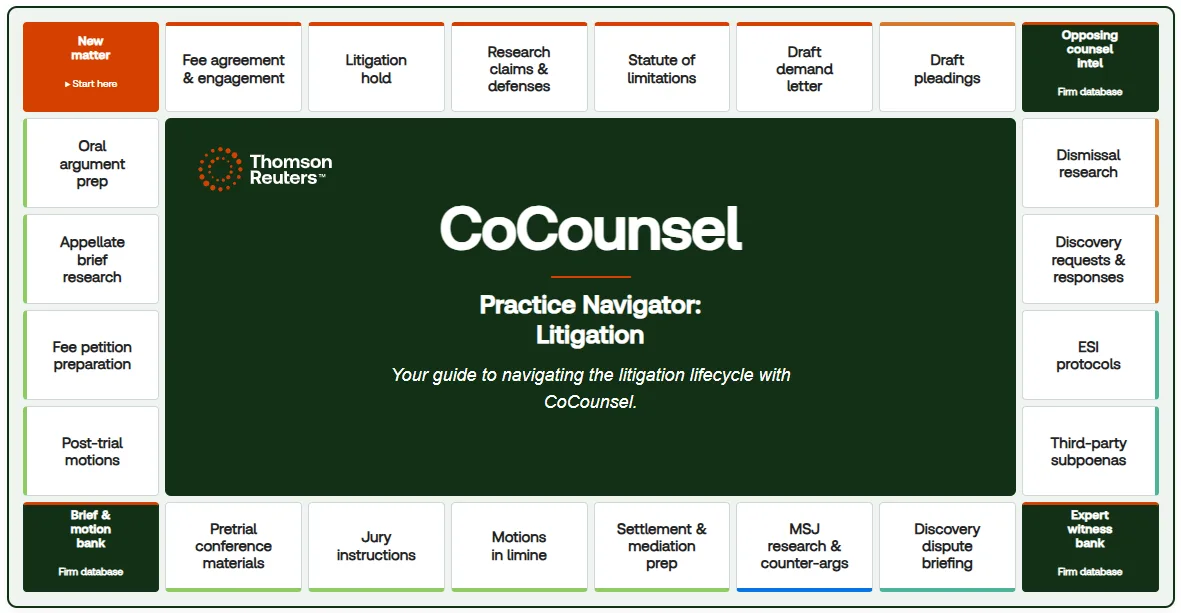
A Practice Navigator is an interactive map of what CoCounsel can do across your practice area, from intake through resolution. Each tile represents a real legal AI use case in your practice area. Click into any tile and you’ll see what CoCounsel does for that workflow, why it matters to a practitioner doing that work, and which Thomson Reuters content — including proprietary and up-to-date resources from Westlaw and Practical Law — powers the result.
Five CoCounsel Legal Practice Navigators are live today: Labor & Employment, M&A, Litigation, Personal Injury Plaintiff, and Insurance Defense. More practice areas are on the way, so if you don’t see yours yet, check back soon.
The prompts are the part worth trying
Every tile on these five Navigators includes a CoCounsel Legal callout: the literal prompt for that workflow in the next generation of CoCounsel Legal. This is what makes “agentic AI” concrete instead of abstract. Instead of hearing that a multi-step research-and-draft workflow becomes a single ask, you can read the actual prompt, in your practice area’s language, right next to the outcome it produces.
Make it yours
The prompts on the board are examples, not scripts. They’re written around a specific fact pattern to show you what’s possible — the real value comes from adapting them to your own matters. A few ways to do that:
- Swap in your own facts. Take a prompt that resonates, drop in your client, jurisdiction, and matter details, and run it in CoCounsel Legal to see what you get.
- Use tiles as a starting point for ideas, not a checklist. If a tile sparks a “could this work for X too?” thought, follow it — that’s exactly what the board is for.
- Explore beyond your usual workflows. Because the board covers the full matter lifecycle, it’s a good way to spot use cases you haven’t tried yet, not just confirm ones you already know.
Questions as you go
If a tile raises a question about a prompt, an outcome, or how it fits your practice, reach out to your customer success team.
Explore the Navigators
All five live Navigators are available now within our training resources. Open the one for your practice area and see where it takes you.